Take-home assessment 8: Pixel problems
- Assigned
- Monday, 18 November 2024
- Summary
- We consider a variety of mechanisms for manipulating images according to their pixels.
- Collaboration
- Each student should submit their own responses to this project. You may consult other students in the class as you develop your solution. If you receive help from anyone, make sure to cite them in your responses.
Name your file for this assignment pixel-problems.scm. Please make sure to begin with the starter code.
Background
As you may recall from your recent work, we can envision each image as a width-by-height grid of colored “pixels”. We call such a structure a “bitmap”. As you might expect, each pixel in the grid is indexed by a column and a row. Here’s a diagram of the indices in a w-by-h bitmap.
       0     1     2     3              w-2   w-1
    +-----+-----+-----+-----+- .... -+-----+-----+
 0  | 0,0 | 1,0 | 2,0 | 3,0 |        |w-2,0|w-1,0|
    |     |     |     |     |        |     |     |
    +-----+-----+-----+-----+- .... -+-----+-----+
 1  | 0,1 | 1,1 | 2,1 | 3,1 |        |w-2,1|w-1,1|
    |     |     |     |     |        |     |     |
    +-----+-----+-----+-----+- .... -+-----+-----+
 2  | 0,2 | 1,2 | 2,2 | 3,2 |        |w-2,2|w-1,2|
    |     |     |     |     |        |     |     |
    +-----+-----+-----+-----+- .... -+-----+-----+
    |  .  |  .  |  .  |  .  |        |  .  |  .  |
       .     .     .     .              .     .
    |  .  |  .  |  .  |  .  |        |  .  |  .  |
    +-----+-----+-----+-----+- .... -+-----+-----+
h-2 |0,h-2|1,h-2|2,h-2|3,h-2|        |w-2, |w-1, |
    |     |     |     |     |        | h-2 | h-2 |
    +-----+-----+-----+-----+- .... -+-----+-----+
h-1 |0,h-1|1,h-1|2,h-1|3,h-1|        |w-2, |w-1, |
    |     |     |     |     |        | h-1 | h-1 |
    +-----+-----+-----+-----+- .... -+-----+-----+
You’ll note that columns run from 0 to w-1 and rows run from 0 to h-1.
We can turn a bitmap into a single w*h vector of pixels by putting each row next to the previous one.
  0      1     2             w-1    w    w+1           w+w-1  w+w  w+w+1
+-----+-----+-----+- .... -+-----+-----+-----+- .... -+-----+-----+-----+- ...
| 0,0 | 1,0 | 2,0 |        |w-1,0| 0,1 | 1,1 |        |w-1,1| 0,2 | 1,2 |
+-----+-----+-----+- .... -+-----+-----+-----+- .... -+-----+-----+-----+- ...
As you may be able to tell, the pixel at position (c,r) can be found at (+ c (* r w)).
Scamper provides two primary procedures that permit us to convert between images and vectors of RGB colors.
;;; (image->pixels img) -> canvas?
;;;   img: canvas?
;;; Returns a vector of rgb values corresponding to the pixels of the given canvas.
;;;
;;; (pixels->image pixels width height) -> canvas?
;;;   pixels: vector? of rgb values
;;;   width: integer?
;;;   height: integer?
;;; Returns a new canvas with the given pixels and dimensions width × height.
Part one: Setting rows and columns
Let’s begin our exploration of bitmaps by working on individual rows and columns of the image.
a. Write the following procedure:
;;; (set-row! pixels width height row color) -> void?
;;;   pixels : (all-of (vector-of rgb?) (has-length (* width height)))
;;;   width : positive-integer? (represents the width of the image)
;;;   height : positive-integer? (represents the height of the image)
;;;   row : non-negative integer?
;;;   color : rgb?
;;; Sets the given row of the image to the specified color.
Here’s a quick experiment you might try with the procedure.
Hint: Write a helper procedure that recurses over the column.
b. Write the following procedure.
;;; (set-rows! pixels width height top bottom color) -> void?
;;;   pixels : (all-of (vector-of rgb?) (has-length (* width height)))
;;;   width : positive-integer? (represents the width of the image)
;;;   height : positive-integer? (represents the height of the image)
;;;   top : non-negative integer?
;;;   bottom : non-negative integer?
;;;   color : rgb?
;;; Sets the rows between top (inclusive) and bottom (exclusive)
;;; to the given color.
Hint: Write a helper procedure that recurses over the rows, calling
set-row! for each row.
Note: Do not set the final row.
c. Write the following procedure.
;;; (set-column! pixels width height column color) -> void?
;;;   pixels : (all-of (vector-of rgb?) (has-length (* width height)))
;;;   width : positive-integer? (represents the width of the image)
;;;   height : positive-integer? (represents the height of the image)
;;;   column : non-negative integer?
;;;   color : rgb?
;;; Sets the given column of the image to the specified color.
Here’s a quick experiment you might try with the procedure.
Hint: Write a helper procedure that recurses over the row.
d. Write the following procedure.
;;; (set-columns! pixels width height left right color) -> void?
;;;   pixels : (all-of (vector-of rgb?) (has-length (* width height)))
;;;   width : positive-integer? (represents the width of the image)
;;;   height : positive-integer? (represents the height of the image)
;;;   left : non-negative integer?
;;;   right : non-negative integer?
;;;   color : rgb?
;;; Sets the columns between left (inclusive) to right (exclusive)
;;; to the given color.
Hint: Write a helper procedure that recurses over the column, calling set-column! for each column.
Note: Once again, make sure not to include the final column.
e. Write the following procedure.
;;; (set-region! pixels width height left right top bottom color) -> void?
;;;   pixels : (all-of (vector-of rgb?) (has-length (* width height)))
;;;   width : positive-integer? (represents the width of the image)
;;;   height : positive-integer? (represents the height of the image)
;;;   left : non-negative integer?
;;;   right : non-negative integer?
;;;   top : non-negative integer?
;;;   color : rgb?
;;; Set a rectangular region of the image to `color`. The region is
;;; bounded on the left by `left` (inclusive), on the right by `right`
;;; (exclusive), on the top by `top`, and on the bottom by `bottom`.
Hint: You should be able to write set-region! with a relatively minor modification to either set-rows! or set-columns! and its helpers.
Part two: Modifying images
Once we can directly access and modify pixels in an image, we also have the opportunity to write more complex image transformations, including transformations based on the position. Let’s start with a somewhat silly one.
Write a procedure, (positionally-transform-pixels! pixels width height), that takes a vector of pixels representing a width-by-height image as a parameter and modifies each pixel by using the following procedure.
;;; (positionally-transform-pixel color col row) -> rgb?
;;;   color : rgb?
;;;   col : nonnegative-integer?
;;;   row : nonnegative-integer?
;;; Transform `color` based on its column and row.
(define positionally-transform-pixel
  (lambda (color col row)
    (rgb (+ (rgb-red color)
            (remainder (round (sqrt (+ (sqr (- col 50)) (sqr (- row 50)))))
                       64))
         (+ (rgb-green color)
            (* 2 (remainder (round (sqrt (+ (sqr (- col 150)) (sqr (- row 50)))))
                            32)))
         (+ (rgb-blue color)
            (* 3 (remainder (round (sqrt (+ (sqr (- col 200)) (sqr (- row 200)))))
                            25)))
         (rgb-alpha color))))
Hint: Think about how to decompose the problem. You will likely find it helpful to write helper procedures (e.g., that process a row or a column).
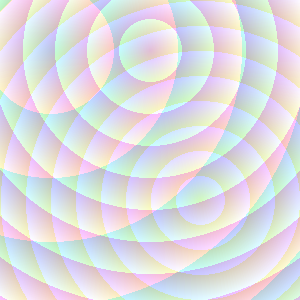
Once you’ve written positionally-transform-pixels!, you can see its effect on an image with the following procedure.
;;; (positionally-transform img) -> image?
;;;   img : image?
;;; Transform an image by adding the column of each pixel to its red
;;; component, the row of each pixel to its blue component, and the
;;; average of the row and column to the green component.
(define positionally-transform
  (lambda (img)
    (let ([pixels (image->pixels img)])
      (positionally-trasform-pixels! pixels)
      (pixels->image pixels (image-width img) (image-height img)))))
Let’s see how it works.
> (positionally-transform (solid-square 300 "gray"))
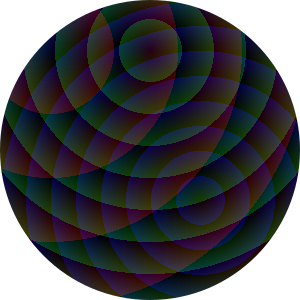
 > (positionally-transform (solid-circle 300 "black"))
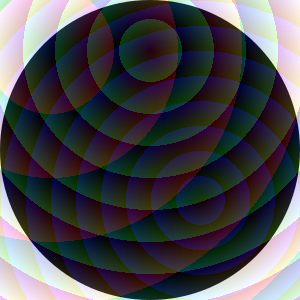
 > (positionally-transform (overlay (solid-circle 300 "black")
(solid-square 300 "gray")))
> (positionally-transform (overlay (solid-circle 300 "black")
(solid-square 300 "gray")))
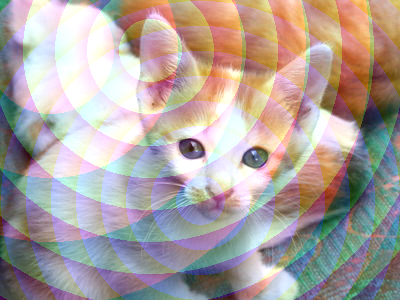
 > (positionally-transform kitten)
Interesting. Perhaps you can find better approaches in the freestyle.
Part three: Steganography
Steganography is a technique for hiding information within a larger corpus. For example, some people conceal messages in letters by using, say, each fifth letter in the original message to represent a new message. (I’m not talented enough to give an example.)
Since our eyes can’t always distinguish nearby colors, images can often be a good host for hidden information; we modify the image to add information at each pixel, or each few pixels.
Here’s one approach for doing so: We develop a mechanism for converting the sum of components in each pixel to a letter. To hide a message in an image, we then convert each pixel so that it has the right sum.
We’ll use a simple mapping of letters to the numbers 0 .. 31.
- 0: end of message
- 1: a
- 2: b
- 3: c
- 4: d
- 5: e
- …
- 20: t
- 21: u
- 22: v
- 23: w
- 24: x
- 25: y
- 26: z
- 27: period
- 28: space
- 29: newline
- 30: reserved for future use; do not use (appears as underscore)
- 31: anything else (appears as asterisk)
How do we convert the components to a number? We can add them up then take the remainder when divided by 32.
;;; (color->number color) -> integer?
;;;   color : color?
;;; Use the not-so-secret formulat to convert a color to an appropriately
;;; representative integer.
(define color->number
  (lambda (color)
    (remainder (+ (rgb-red color) (rgb-green color) (rgb-blue color))
               32)))
Suppose we want to encode the word “cat” in our image, and that the first four pixels in the image are (rgb 255 100 10), (rgb 255 100 255), (rgb 255 100 10), and (rgb 100 200 128). The sum of the components in the first pixel are 365. (remainder 365 32) is 13. We want it to be 3 (the letter c). So we need to subtract ten from the components. Perhaps we use (rgb 248 98 9). Let’s check.
> (color->number (rgb 248 98 9))
3
We could also have used (rgb 255 90 10) or (rgb 251 97 7) or any other way of subtracting ten.
> (color->number (rgb 255 90 10))
3
> (color->number (rgb 245 100 10))
3
> (color->number (rgb 251 97 7))
3
On to the next pixel.
> (color->number (rgb 255 100 255))
2
That one’s pretty close. We want a remainder of 1 for an a. So we can convert the color to (rgb 254 100 255).
> (color->number (rgb 254 100 255))
1
The next pixel is the same color, which gives a remainder of 2. We need to get it all the way to 20 for a t. So we could add 18 to the 100 and use (rgb 255 118 255).
> (color->number (rgb 255 118 255))
20
Alternately, we could subtract 14 (perhaps 6 from the red, 2 from the green, and 6 from the blue).
> (color->number (rgb 249 98 249))
20
How do we decide whether to add or subtract? There are many strategies. Since we have to subtract from white and we have to add to black, it might be easiest to subtract from colors whose components sum to more than 127x3 and add to colors whose components sum to less than that.
Here’s one strategy, which uses randomness to encode the letter in a color.
;;; (encode-letter color) -> color?
;;;   letter : char?
;;;   color : color?
;;; Encode a letter in a color, creating a nearby color.
(define encode-letter
  (lambda (letter color)
    (let* ([current (color->number color)]
           [target (letter->number letter)]
           [pos-diff (remainder (+ 32 (- target current)) 32)]
           [r (color-red color)]
           [g (color-green color)]
           [b (color-blue color)]
           [a (color-alpha color)]
           [goal (+ r g b pos-diff)])
      (if (> (+ r g b) (+ 1 (* 3 127)))
          (color-decrement-to r g b a (+ -32 goal))
          (color-increment-to r g b a goal)))))

;;; (color-decrement-to r g b a target) -> color?
;;;   r : rgb-component?
;;;   g : rgb-component?
;;;   b : rgb-component?
;;;   a : rgb-component?
;;;   target : (all-of exact-integer? (at-least 0) (at-most (+ r g b)))
;;; Randomly decrement `r`, `g`, and `b` until we reach a sum of `target`.
(define color-decrement-to
  (lambda (r g b a target)
    (let ([rgb-sum (+ r g b)])
      (if (= rgb-sum target)
          (rgb r g b a)
          (let ([rand (random rgb-sum)])
            (cond
              [(< rand r)
               (color-decrement-to (- r 1) g b a target)]
              [(< rand (+ r g))
               (color-decrement-to r (- g 1) b a target)]
              [else
               (color-decrement-to r g (- b 1) a target)]))))))

;;; (color-increment-to r g b a target) -> color?
;;;   r : rgb-component?
;;;   g : rgb-component?
;;;   b : rgb-component?
;;;   a : rgb-component?
;;;   target : (all-of nonnegative-integer? (at-most (* 3 255)) (at-least (+ r g b)))
;;; Randomly increment `r`, `g`, and `b` until we reach a sum of `target`.
(define color-increment-to
  (lambda (r g b a target)
    (let ([rgb-sum (+ r g b)])
      (if (= rgb-sum target)
          (rgb r g b a)
          (let ([rand (random (- (* 3 255) rgb-sum))])
            (cond
              [(< rand (- 255 r))
               (color-increment-to (+ r 1) g b a target)]
              [(< rand (+ (- 255 r) (- 255 g)))
               (color-increment-to r (+ g 1) b a target)]
              [else
               (color-increment-to r g (+ b 1) a target)]))))))
Let’s give it a try.
> (rgb->string (encode-letter #\t (rgb 255 100 255)))
"250/97/249"
> (rgb->string (encode-letter #\t (rgb 255 100 255)))
"248/99/249"
> (rgb->string (encode-letter #\t (rgb 255 100 255)))
"246/98/252"
> (color->number (rgb 250 97 249))
20
> (color->number (rgb 248 99 249))
20
> (color->number (rgb 246 98 252))
20
Great. We have a procedure that lets us encode letters. One fewer step in the bigger picture.
Where were we? Oh, that’s right. We were encoding the word "cat". We’ve done the first three letters.
Last up is the “end of message” value, 0. Let’s see what value the current color gives.
> (color->number (rgb 100 200 128))
12
As always, there are many possible colors. We’ll go with (rgb 96 196 124).
> (color->number (rgb 96 196 124))
0
We’re done. At least we’re done with the example. Now it’s time to write some helpful procedures.
a. You may note that encode-letter requires a helper procedure, letter->number. Write at least three additional tests for letter->number and then implement it.
> (letter->number #\b)
2
> (letter->number #\nul)
0
> (letter->number #\space)
28
> (letter->number #\.)
27
> (letter->number #\?)
31
> (letter->number #\!)
31
b. Document, write at least three additional tests for, and implement a procedure, (color->letter color), that uses the “add the components, take the remainder, look it up in the table above” approach to find the letter that corresponds to a color. (You can use #\nul for “end of input”.)
> (color->letter (rgb 0 0 0))
#\nul
> (color->letter (rgb 33 0 0))
#\a
> (color->letter (rgb 32 (+ 32 27) 0))
#\.
> (color->letter (rgb 32 64 (+ 128 28)))
#\space
> (color->letter (rgb 32 64 (+ 128 29)))
#\newline
> (color->letter (rgb 32 64 (+ 128 30)))
#\_
> (color->letter (rgb 32 64 (+ 128 31)))
#\*
c. Document and write a procedure, (extract-text pixels), that takes a vector of colors as input, reads all of the letters (using color->letter) until it hits #\nul, and then puts them together into a string. If there’s no #\nul,
> (extract-text (list->vector (map (lambda (x) (rgb x 0 0))
                                   (range 1 65))))
"abcdefghijklmnopqrstuvwxyz. \n_*"
> (extract-text (vector (rgb 1 1 1) (rgb 0 1 0) (rgb 5 5 10)
                        (rgb 8 8 16)))
"cat"
> (extract-text (list->vector (map (lambda (x) (rgb x x x)) (range 1 10))))
. . vector-ref: index is out of range
  index: 9
  valid range: [0, 8]
  vector: '#(#(struct:object:image% ... ...) #(struct:object:image% ... ...) #(struct:object:image% ... ...) #(struct:object:image% ... ...) #(struct:object:image% ... ...) #(struct:object:image% ... ...) #(struct:object:image% ... ...) #(struct:object:imag...
; We never hit a zero, so this crashes.  That's okay. You could also stop
; at the end of the vector.
d. Document and write a procedure, (steg-decode img), that takes an image as an input and “decodes” hidden text using extract-text.
> (steg-decode (overlay (solid-circle 10 "black")
                        (solid-square 10 (rgb 1 0 0))))
"aaa"
e. Document and write a procedure, (insert-text! text pixels), that takes a string and vector of colors as input and updates the colors in pixels so that they encode the text.
> (define example (make-vector 6 (rgb 0 0 255)))
> (insert-text! "cat" example)
> (vector-map rgb->string example)
'#("1/3/255" "0/2/255" "7/14/255" "1/0/255" "0/0/255" "0/0/255")
; Note that we changed *four* colors.  We needed to insert the null, too
> (extract-text example)
"cat"
> (let ([aphorism (make-vector 128 (rgb 128 128 128))])
    (insert-text! "there is more to life than computer science." aphorism)
    (extract-text aphorism))
"there is more to life than computer science."
You may assume that (vector-length pixels) is larger than (string-length text).
f. Document and write a procedure, (steg-encode text img), that takes a string and an image as input and “encodes” the text in the image using the specified technique. steg-encode should return a new image.
> (steg-decode (steg-encode "there is more to life than computer science"
                            (solid-circle 20 "blue")))
"there is more to life than computer science"
Wasn’t that fun?